New Edit buttons and fields by hand
In Edit, select a button or field to remove, hide or rename it.
What's new on spacesheep. We ship improvements to the /sheep skill, the in-viewer assistant, and publishing continuously.
In Edit, select a button or field to remove, hide or rename it.
Settings, the dashboard and notifications are translated, and Vietnamese and Thai are now available.
The agent composer has a Create button. On a keyboard, press Enter to send or Shift+Enter for a new line.
The model picker shows how much of your allowance is used and when a used-up model returns. Shepherd keeps your unsent message while you wait.
Picking a suggested person fills the Share box. Choose their access and press Add when you're ready.
The conversation keeps your place as replies arrive. Use the down arrow to jump to the latest message.
Return to the dashboard after creating a space and its card appears without a reload.
Ask your connected agent to create a space in a team, and its answer tells you where the space lives.
The build shows more of its progress, and PDFs attached to Shepherd show page previews and a page count.
Speak can open the comment box for selected text, so your comment lands on the words you meant.
Shepherd can read attached PDFs, reuse their pictures in a space, and add the original file as a download. PDFs can now be up to 40 MB.
Settings shows each language by its own name and suggests your browser's language if you haven't chosen one yet.
Readers can ask for editing rights from Share, and owners can approve from their notifications or email.
Add people to share lists by @username, with suggestions as you type. Suggestions also help when inviting team and organization members.
Click a picture in a comment to see it full size without leaving the space.
Spaces can have forms that visitors fill in without signing in. You get a notification and an email with their message.
New invitations in Share default to Can view. Choose Can edit when you want someone to make changes.
Refreshing a space or switching versions no longer adds extra Back steps. The viewer's Back control works on phones too, with a menu to reach Your spaces.
Ask your agent for a carousel in a space. Readers can drag it with a mouse or swipe on a phone.
Shepherd can now change a space's linked scripts and styles, so it can fix layouts and controls kept in separate files.
The corner comment button switches pinning on and off. Drag the toolbar out of the way, and open the comment list from the count beside the button.
Embedded players can use autoplay and picture-in-picture, and videos that need protected playback can play in the viewer.
Each plan now includes the models of the plan below it, and higher plans' models show as locked in the picker.
You can see when it's available again, and your conversation stays put.
Undo goes further back, and formatting is quicker as you type.
A background tab shows a dot when something needs you.
Easier to find and to pick when you share a space.
Copy the link to a comparison and it opens the same one.
Sign up for news at spacesheep.dev/subscribe.
Visitors are now asked to sign in instead of seeing Not found.
Pages about an event can invite readers to it.
It's easier to see who signs where.
Switching between them no longer loses your place or does nothing.
Read out loud starts sooner, and the mic shows when it hears you.
Resetting your password now signs you out everywhere at once.
Give ChatGPT, Gemini and others a link they can read.
Start a new stack from the dashboard in a couple of steps.
You'll be told when a private page turns someone away.
A page's own Download PDF button now works in the viewer, and the PDF keeps the page's fonts, colours and layout with no blank last page. Download buttons on private pages download the file instead of a sign-in page.
On a public page, ⋯ → View as a visitor shows it exactly as someone without an account sees it, with their buttons and their view of the page's data. A pill in the corner takes you back.
Double-click any words on your page to start editing right there. While editing, Edit with AI opens Shepherd beside the page, and it saves what you typed before it starts.
In Share, turn on Hide the Spacesheep bar and readers see your public page on its own, with no header above it. You and your editors still see the bar.
Settings → Integrations is now one table: what your agent is connected to comes first, and everything else it could use sits below with its Connect or Add key button, grouped by how you set it up.
The browser extension now installs in Firefox too, so you can send the page you have open, or files from your computer, to your spacesheep account from Firefox as well as Chrome.
The agent that works on your pages has a shorter name. It does the same things in the same places: the side panel, comments, notifications and Settings.
Your agent can search the web and read pages without a key of your own, on Free, Pro and Max, up to a daily allowance per plan. Settings → Integrations shows today's use.
Meetings your agent books in Google Calendar, and bookings made on your booking pages, now get a Meet link, unless the meeting is in person.
You can change your @username in Settings as often as you need. Links to your profile and pages under your old name keep working, and nobody else can take it.
Ask "email me when it's ready" or "email me when someone fills in the form", and your agent sends the note to your own address. The first response is mailed at once, then at most one summary an hour, and every email has a link to stop them.
New accounts see a ready-to-copy prompt above the starter ideas, so you can make your first page straight from Claude Code or any coding tool you already use.
From a page's ⋯ menu, ask people to sign it: each person signs a fixed version with their typed name, and everyone gets the signed copy and a certificate as PDFs by email. Paid plans send without limit and Free accounts can send 15 requests a month. Your agent can request and track signatures too.
Write @spacesheep in a comment, or press Ask Spacesheep on a pin, to ask the agent about that spot. It answers in the thread and can change the page right there, and a reply in that thread asks it again. Your comment posts at once while it works.
In ⋯ → Edit the whole page is one sheet: click anywhere and type, and Enter, Backspace, paste, bold, italic and undo behave as you expect. Typing #, -, 1. or > and a space starts a heading, list or quote, and a new blank page opens ready to type and saves as you go.
Settings → Integrations has a single Connect GitHub button: pick the account and repositories on GitHub and you come back connected, private repositories included. It works for you or for your whole team, with no tokens to create or paste.
When many people comment at once, a reply you are typing keeps its words and place, deleted or resolved comments no longer come back, and two people resolving the same thread no longer reopen it. Pages with hundreds of comments stay responsive.
Share profile gives you a link and a QR code anyone can open, even without an account, to add you as a friend or follow you in a tap or two. You can reset the link at any time.
Profiles open with a cover band in the person's colour, their counts as numbers, mutual friends, how long they have been making spaces, and their pages as picture cards.
The share dialog now asks the two questions separately: which team or Personal space the page lives in, and who can open it, with three plainly described access levels. Resting on Share in the viewer also shows who can open the page.
Type a colon and two letters in any comment box, like :sh, and pick an emoji from the list. A full :tada: turns into its emoji when you close it.
On a page shared with your team, everyone on the team appears in the @ list. A mention now reaches the person's bell as soon as you post, instead of a few minutes later.
Each result shows when the page was made and last changed, and on your own pages who can open it and how many readers it has. Results no longer repeat the title in the snippet.
Press ⌘K (Ctrl+K on Windows and Linux) on any signed-in page, even while reading a space or typing in a field, to jump to search.
Paste, drop or attach images, PDFs and text files to "Create a doc with an agent", and the agent works from them. Dropping a file anywhere on the dashboard opens the composer with it attached.
A page being built shows its steps in plain words and no longer goes blank midway. If a Co-shepherd turn fails, you can send it again on another model with one press.
Whether Co-shepherd and Comments were open or closed is remembered for each document, so a page reopens the way you left it.
Settings → Billing lets a subscriber move between Pro and Max on the same subscription, without cancelling and buying again.
When an agent starts a new page, it sends you the link first and you watch it come together there, instead of waiting for the finished page.
Ask for pictures of a real place, product, dish or person and the agent uses photographs instead of drawing them. Drawings are kept for art or when you ask for one.
A page that doesn't exist now has a small game: press Space or tap and the sheep runs and jumps over rolling boulders, with a few secrets to find.
Stacks group your pages by what they are about, on Max and Team plans. Inside a stack the pages you open most or made recently come first, a page shows its stack next to its title, and filing a page offers New stack with a suggested name and emoji.
A Chrome extension moves whatever a tab shows into spacesheep: pages, pictures, PDFs, video, Markdown and CSV, plus files and folders from your computer. Add it from the Chrome Web Store.
Your page lists now order by edits people asked for. A page a script refreshes on a schedule no longer jumps to the top; its card says when it was refreshed and keeps the last person's change in view.
See change, Changes and Compare now open the comparison inside the viewer: side by side on a computer, a redline on a phone. Point at a change to see what asked for it, and restore an older version from the same bar.
Checklists agents build for a group, like action items or launch lists, now share their ticks, so when one person checks an item everyone sees it and who ticked it.
The viewer's Back button now takes you back to where you came from, even after jumping around a page's contents or opening an older version.
A page can show a live camera: press Film here to stream from a phone, a camera or your screen. It can also draw boxes around people in view and log each new arrival with a photo you can name. Filming needs Max.
While an agent works on a page, the page itself shows the step it's on, who is working and how long it's been, with the sheep flying through drifting clouds. Finished steps sit behind a button that lists each one with how long it took.
A page that belongs to your team shows the team's name and picture above its title. Its share dialog names the team and who is on it, and asks before opening the page to anyone outside it; Move to Personal brings a page back.
Install spacesheep from Chrome's menu on Android, then pick Share → Spacesheep in any app to save a link, text, pictures or PDFs. You see a preview first, and nothing is saved until you tap Save privately.
When Co-shepherd took sections off a page, the person who asked kept seeing them until they reloaded. They now go away on your screen as soon as the change is saved.
Lists from the agent put each item on one line, say times in your own timezone, and link the item's name instead of pasting a raw URL.
An agent publishing through the spacesheep CLI can now delete a space it made by mistake, and it no longer reports a space as deleted when the delete was refused.
A team's home is now at an address like spacesheep.dev/t/night-owls, and renaming the team moves it while old links keep working. On a team's pages the logo takes you back to the team's home, not to Personal.
When someone shares a space with you from Claude Code, you now get a notification in the bell as well as the email.
Settings → API keys can now make a Read only key, which lets an agent read your pages and nothing else. It's the safe way to let a machine that publishes as one account read another account's pages.
A page that draws its own comments can switch ours off for one part or the whole page, so clicks there reach the page. Ask Co-shepherd to do it, or add data-ss-comments="off".
Co-shepherd running on Grok now reads pictures attached in the panel or in comments instead of saying it can't see them.
When you ask @spacesheep in a comment, any picture in that comment or earlier in its thread goes along with the question, so you can show what you mean.
Annotate can now pin a comment on a button, link, picture or drawing inside a page, and works inside pop-up dialogs too. Typing right after you select text now lands in the pin's comment box.
Every Feedback entry now offers two places: a private thread with the team, where a person always answers, and our Discord community.
Asking Co-shepherd or Speak right after typing on a page now saves your typing first, so the change is made to the page as you left it. A Co-shepherd draft on a new blank page now shows up instead of staying hidden.
Plan & billing is one tap from the account menu, and the plan comparison shows checks and prices at a glance, fitting a phone screen. Free accounts see a small Upgrade link by their handle.
Confirm a new account by typing the code from the email into the same tab, with an Open Gmail button that goes straight to the message. On phones the form comes first, and new accounts start with a clean username from their email.
Pasting a long page now keeps its lines and saves, instead of being refused and leaving the page empty for everyone it was shared with.
New pages no longer all come out white in the same plain font. Each starts from a look — a background tint, fonts and an accent — chosen to fit what the page is for, so a legal deadline stays sober and a party invite can be playful, and the accent can come from the page's subject. Edits keep the page's own look.
Search ranks pages by what you meant, not only the words you typed: pages that match every word, and the ones you tend to open for a query, come first. Team searches find pages shared with the team.
The top bar is now a floating glass capsule on every page, with the page running underneath it. Its edge shimmers while someone is writing the page, and Back slides out when you point at it.
Every reply on /me/agent carries a small receipt of the run behind it, opening on its own when something failed. Co-shepherd edits, builds and scheduled tasks show up in the same timeline.
When a page you asked for on the dashboard ended with a written answer instead of a page, that answer is now published on the page you were taken to, instead of the page being put away.
While Speak is listening you can switch to typing, starting from the words it heard. Typed asks get quick matches for your spaces as you type.
Drop a CSV, TSV, Excel, ODS or JSON file on the dashboard to make a private data space. You review the title, sheets and headings first, and the space lets you switch sheets, search, filter, sort and export as CSV or JSON. No AI key is needed.
Signed in, /start gives you your own setup prompt with a one-time code, so your coding agent can publish in the same session with no Approve click or restart. The page turns green when the computer connects.
The model picker for a new page now starts with Auto, like Co-shepherd, so the right model is chosen for each ask. A model you pick yourself is still remembered.
Settings → Integrations → MCP servers takes any MCP server's address, and your agent can use its tools everywhere you talk to it; a team admin can add one for the whole team. Granola is a one-click connect, and a server whose own sign-in doesn't work with spacesheep can take a pasted token instead.
Comments, replies, signatures and other updates on the same page now share one card in the bell, with the title shown once and a line per event.
A dark page now opens in a dark frame and a light page in a light one, instead of always following your theme. A theme you pick in the account menu still wins.
When the Co-shepherd drawer is closed on desktop, its tab now stays on screen and grows as your cursor nears the edge. The thin strip it used to leave down the page is gone.
If the page can't take a change Co-shepherd made, it tries once more on its own; if that fails too, the reply starts with "Nothing on the page changed" and offers Retry. Large style changes are also allowed now.
A comment on a list item or paragraph now pins there, even on pages without marked sections, and every comment says where on the page it sits, so Co-shepherd and your agent know what you meant.
Some ad blockers hid the Share button on every page. It now shows in Chrome and on phones with those blockers turned on.
In Safari on Mac, iPhone and iPad, coming back to the dashboard no longer opens "Jump back in" and the keyboard on its own. Search opens only when you click or tap it.
Pro and Max accounts can now publish up to 2,000 times a day, up from 400, which suits several coding agents publishing at once. Free keeps 400.
Claude Haiku 5.5, released today, can be chosen for your agent and Co-shepherd.
Coding agents like Claude Code and Codex can now read from the apps your spacesheep agent is connected to, such as Calendar, Linear, Zoom, Stripe and MCP servers you added. Access is read-only.
If you're looking at the "This space is private" page and the owner shares it with you, the page now opens on its own without a refresh.
spacesheep has a new sheep and wordmark across the header, browser tab, emails and link previews, with a glow behind it in the dark theme.
A new comment or reply shows up on the rail right away, marked "Sending" until it's saved. The box clears at once, ready for your next thought.
A link to a section of a page now opens at that section for readers who aren't signed in, and keeps it when you switch versions.
Your plan now shows as a small PRO or MAX badge on your @handle in the header, on desktop and in the phone menu.
Owners and editors can ask Co-shepherd to fix or change how a page behaves, not just its words. It makes the exact change, saves it as a new version and reloads the page so the new script runs.
An owner can let readers copy a page from the Share dialog. People on Pro and up then get a private copy of their own to change, with its own sharing, history and an address from its title; later edits to the original don't reach it.
If you haven't added a model key, your agent now runs on ours within a monthly allowance: Grok on Free, Gemini on Pro and Max, with Claude for Max's bigger builds. Settings → AI assistant shows what's left, and quick edits stream onto the page for everyone.
Asking Speak to make a page now opens the composer, fills in your ask and starts the build, so you watch the page come together instead of it being made out of sight.
The comments rail has a sort picker: Latest activity (the default, newest message at the bottom), Date started, or Position on page. Your choice is remembered in this browser.
The dashboard's layout switch has a Compact option: one thin line per space and a hundred to a page. Rows is now the default view, and Show more remembers how far you expanded for an hour.
Editors get a Discussion tab beside Comments: a working thread for planning changes with each other and their agents, with topics, numbered replies, decisions and pins. Titles are optional.
Page titles with ampersands and other symbols no longer show as code like & on cards, in search, in notifications or in link previews.
Pages made from the dashboard composer no longer keep a blue tint from the placeholder; their cards take the finished page's colours.
Daily backups now save your memory and attachments before your spaces, so a large library no longer keeps them from ever being backed up.
Co-shepherd's steps now appear in its drawer with how long each took, then fold into a summary, instead of a card covering the page. The drawer collapses to the edge rather than closing, and on phones it leaves a strip of the page visible.
You can keep sending while Co-shepherd is busy. Messages wait in a list above the box, where you can edit or remove them, and go out on their own as soon as it's free.
Your first ask now gives the page a title and a readable address in about a second, instead of it staying Untitled until the page is saved.
If you've connected more than one Google Calendar, booking pages now avoid times that are busy in any of them. Settings says which calendar new bookings go to.
Selecting a label in a diagram and commenting now pins the comment to that label, and the label stays visible while the comment is shown.
Settings → Chat apps gathers the places you talk to your agent, with a card per app showing whether it's connected. WhatsApp numbers can be linked and unlinked there.
When a model can't answer, for example because its account is out of credits, the agent now says so plainly with a link to top up. On Telegram, /model shows what your agent runs on and switches it in one tap.
A brand-new dashboard now explains, under the starter ideas, what a space is and the places you can make one from: the dashboard, Claude Code, Codex, Cursor, ChatGPT, Claude.ai or Telegram.
The setup pages now have a Connect to Claude button and an Add to Cursor link that open each app with spacesheep already filled in.
When an assistant reads a space with a large data file, it can now ask for a count or a filtered list instead of reading the whole file, so its numbers come out right.
Fixed pages like the dashboard and Settings sometimes loading forever after an earlier request was cancelled on a slow link.
A team admin can click the team's crest in Settings → Team, or drop an image on it, to give the team a picture. It shows on the team's home, in the workspace switcher and on the dashboard's team cards, as a rounded square so a team never looks like a person. Click the team's name to rename it.
The search in the header, and the Everything tab of search results, now find people by name or @username alongside spaces, each with their picture and a link to their profile.
Searching for a word that matched many of your pages could fail outright, and archiving more than about 100 spaces at once from All spaces failed. Both work now, and when search really is unavailable it says so instead of "No spaces match".
Pictures posted with an @mention in a channel, or in a thread the agent is in, now reach it the way pictures in a direct message always did, so it can read a screenshot wherever you share it.
A tab you've left open now shows "A new version of Spacesheep is available" with a Reload button under the header. It never reloads on its own, shows at most once every few hours, and closing it in one tab closes it in all of them.
If Speak can't start your microphone, it no longer ends in a dead error: the card becomes a field you can type your ask into and send, with Speak again to retry the mic.
After you accept a friend request in the bell, its Accept and Ignore buttons no longer come back a moment later or after a reload.
The people suggested under Add people in the Share dialog now open above the field, so they no longer run off the bottom of the dialog, and password managers no longer try to fill that field.
A Co-shepherd turn that's interrupted by an update now starts over cleanly instead of leaving a half-written reply, and every turn ends with a sentence saying what happened. Long edits no longer die partway, and a change cut off by a time limit is never saved as if it were the whole thing.
While you're still talking, Speak shows the spaces your words seem to name, and you can tap one to open it right away. Words you've used again and again to reach the same space now open it the moment you stop talking.
Write someone's @username in a page's words and they get a notification and an email, once, if they can open the page. Tags are highlighted for readers, typing @ while editing a page suggests people, and the email's link takes them straight to the tag, even inside a closed tab or section.
If you've forgotten your password, Settings now lets you get a reset email with your address already filled in, and brings you back to Settings when it's done. The change-password button only turns on once the new password is ready, and Sessions has its own card.
Links in a message are now clickable no matter who sent it.
Some pages, such as visualizations exported from Codex, carry their own strict security settings, which kept readers from signing in to comment. Comments now work on those pages too.
Someone you've given "Can edit" on a page can now publish changes to it from Claude Code or another agent, not only in the browser. Sharing settings stay with the owner.
A link to another space inside a published page now shows the same preview card on hover as a link in a comment. The card is smaller so it doesn't cover what you're reading: the page's picture, title and two lines, and the whole card opens the page.
A team admin can connect Stripe from Settings → Team in one click, read-only. Everyone's agent on the team can then read revenue, subscriptions, customers and invoices and build dashboards from them, and a page can show Stripe figures as they are when it's opened.
If you changed your language on another device or through your agent, a browser that had the old one now switches too, instead of staying in the old language.
The code box in Settings → Billing now takes discount codes as well as plan codes, and opens checkout with the discount applied. A link with a code in it fills the box, even if you sign in first.
A scheduled task cut off by an update now runs again instead of being dropped, and an agent's "working on it" card goes away when its run ends rather than reading "may have stopped" for hours. Runs on Grok also no longer lose a step partway through.
A server, script or sensor can now send live values, like a load average or a temperature, into a page, and everyone who has the page open sees them as they arrive; the page's buttons can also send commands back to the machine, and can be limited to people who can edit the page. Sending needs Max; watching is free for anyone who can open the page. spacesheep.dev/streams explains it with a demo that runs in your browser.
Asking the Co-shepherd to remove something now takes it off the page instead of hiding it, it can change one card in a grid on its own, and it never says a style change was applied when it reached nothing. Text like "<your-mac>" in an edit is kept as written instead of throwing the change away.
A team's home now has the dashboard's header, sorting, card grid and search box, limited to the team's spaces, plus Bookmarked and Archived views. On the dashboard, each team card shows a collage of its newest spaces, and new teams are made in Settings → Team. The workspace switcher works from the keyboard.
Cards on your dashboard show a picture of their page, with the title and details over it, and a Tiles | Rows switch next to the sort turns the same cards into a list.
A new account is asked once to pick a username, with a suggestion already filled in, so the first links you share carry your name. Once you have one, the account menu shows your @username instead of your email and links to your profile.
On a phone the header no longer wraps to two rows: search and the bell stay, and Messages, Settings and your account fold into a ☰ menu that closes with a tap outside it.
On the plans page your current plan is marked, with a way to manage it, and plans it already includes say so. Signed out, Get Pro, Get Max, Team and an invite link each say what you're buying or joining and lead with Create an account.
Pending invites say when they expire, an owner can revoke one, and creating an invite shows its progress and says what went wrong. Settings → Team tells owners what adding a person costs, doesn't offer Leave to a team's only admin, and explains why a paid team can't be deleted yet.
After signing up, resending or asking for a reset, refreshing the "Check your email" page no longer sends another email, and the page says plainly what was sent.
Attach pictures, PDFs and text files to a Co-shepherd message with the paperclip, a paste or a drop. Everyone in the chat sees them, the Co-shepherd reads them, and it can put an attached picture on the page.
The app's styles and scripts are now downloaded once and kept, so moving between pages transfers a small fraction of what it did, and the dashboard, Sessions and Messages start loading while you hover their links.
Comment cards now lead with the words. React, resolve and the rest appear when you point at a card, under a ⋯ menu on touch screens, and Reply is the one button always shown.
If you're on a team, the header now shows where you are — Personal, or the team's name — and its menu takes you to your own spaces, any of your teams, or a new team. Each team has a home page with its shared spaces, people and settings. The gear opens the settings of the workspace you're in, and Account settings in your menu always opens your own.
The Team page is now one card: name your team, then pay by card or use a code from the Spacesheep team. There's no address to pick, and New team on the dashboard works the same way. When it's done, the card says when the team renews and what each person costs, and links to setting it up; a Free team you already own can take a code right from its row.
A profile with no pictures or files no longer shows an Overview | Media switch that leads to an empty gallery.
Team now costs $10 a month per person, and every member gets Max — Speak and an agent that needs no key of its own — not just Pro. Settings → Billing shows a team seat as Max through your team, and the limits table marks your plan.
In Settings → Team, each team's card shows its plan, the price per seat and when it renews or ends, and a team admin's Manage billing opens the bill. A team with its own address also gets a Billing tab in its settings.
When checkout failed, the Team page and Settings → Billing just said "Something went wrong." They now say whether the problem is on our side (and that we've been told) or the payment service didn't answer and a retry in a minute should work.
Opening a team's own address right after paying could show "Not a member", and Go to your spaces looped back to the same page. The team's site now checks who you are with spacesheep.dev first, then lets you in.
Pick one of 12 languages under Settings → Account → Language. Menus, settings, the dashboard, the Share dialog, the comments panel and the viewer's controls follow it — more of the app as it's translated — and your agent writes to you in it. Your pages keep the language they were written in.
Share a link to a page anyone can open and its preview — in chats and on social sites — now shows a picture from the page: the one the page sets for previews, or else a snapshot of the page itself, instead of the same drawn title card every time. Pages that need a sign-in keep the title card.
Point at a comment's pin and a card shows who wrote it and when, its opening lines, how many replies it has and whether it's resolved; click to open the thread, and on a touch screen a tap still opens it straight away. Names and faces in comment threads now link to people's profiles.
A comment pinned to a table cell, a list item, a picture or a label inside a diagram now stays on that cell or label, even when the columns reflow or a row is added above. On pages that redraw themselves — a diagram you zoom, an app with several screens — a comment can follow a named part through every redraw, and Show brings that part back into view.
Copy buttons across spacesheep now show that they worked, and when the browser blocks copying they open the text ready for you to select. Copy buttons inside your own published pages work in the viewer too.
Settings → Integrations → Google Calendar lists each connected Google account by its email, each with its own reconnect and disconnect, and you can add more. Your agent picks the right account for each request, and booking pages keep using the first one you connected.
When a spoken ask fails, Speak shows the words it heard so you can correct them and try again; when the Co-shepherd takes an ask over, the Speak card follows it to the end, with Stop and Undo. Replies show real links and lists, dictation drops filler sounds like "uh" and "um", ⌥S opens Speak while you read a space, and you can drag the mic anywhere on the screen.
The dashboard's view button shows what you're looking at and how many, and opens a menu of All spaces, Bookmarked and Archived. Spaces you archived are listed there for you alone, and each card's ⋯ menu restores one. The Bookmarked view shows 12 spaces before Show more.
On a phone the dashboard's tools now sit in two rows, so the sort words no longer wrap, and the filter menu, search suggestions and card menus stay inside the screen. Signed in, the header on public pages like Plans and Docs no longer runs past the edge.
Password managers no longer offer to fill or save passwords in fields like search, team names or settings. Signing in and signing up work with them as before.
The progress card over a page now goes away when the Co-shepherd finishes, fails or is stopped, instead of lingering. One left behind by a run that went quiet disappears after ten minutes.
The search in the header is now there for everyone signed in, on every page. It finds your own spaces plus ones shared with you or your team, ones you've bookmarked or read, and public pages; each result says "Yours" or whose it is, and See all results opens an Everything tab.
Each card on your dashboard takes its colours from its own page: a light page puts its paper behind the emoji and a wash of its accent on the card, and a page with a dark background makes the whole card dark. Cards for pages without clear colours look the same as before.
Pressing a space card starts loading the page before you let go, and the page grows out of the card while it arrives instead of waiting on an animation. The loading sheep now covers only the page you're leaving, so the new one shows as soon as it's ready.
Ask the Co-shepherd to add something to a page you can edit — photos, a download button — and it now changes that page instead of publishing a separate new space. To start a different page, use your dashboard.
Delete asks on the comment and says what happens to the thread; Resolve and Reopen offer Undo, and counts include only open threads. A page's owner can delete any comment, including the Co-shepherd's, and an @co-shepherd ask that couldn't finish gets a quiet Try again. When Claude Code or another connected agent answers a comment, the reply now lands in that comment's thread.
On a touch screen a comment pin stays see-through until you hold its thread, buttons don't stay lit after a tap, the reaction picker stays inside the panel, and keyboard hints are gone. Pressing Enter to confirm Japanese, Chinese or Korean input no longer sends the comment.
People with access now shows each person's picture and name above their @handle or email, in even rows with a quiet role picker. If you own the page and haven't shared it yet, the list stays hidden instead of telling you that you can open your own page.
A person's avatar could be one colour beside the page's title and another among the faces of people viewing; it's now the same everywhere. A page's owner no longer sees their own name tag next to the title.
A new key in Settings → API keys now sits in its own field with Copy and a one-time warning, with each way to use it a single command you can copy. You can also make a Sessions only key, which can report your coding sessions from a machine's hooks and nothing else — the safe kind to leave in a hook config.
On your own computer, one command — codex mcp add spacesheep --url https://mcp.spacesheep.dev/mcp — connects Codex: you approve the sign-in in your browser and there's no key to copy. The setup guide still covers remote machines and the API-key route.
When an agent like Claude Code needs to sign in the spacesheep CLI, it runs the sign-in itself and gives you a short link and a code — you just press Approve. An agent that hits a private page it can't open, over SSH or from a script, is now told exactly that way in, then how to read the page.
If you share your AI keys with friends through a Starter config group, each friend now gets a daily allowance on each key (20 million tokens on Gemini, 3 million on the others); when one runs out their agent moves to the next, and says so when none are left. Starter is offered only to friends you invite, and Settings → Config groups shows each member's last 24 hours.
A form on a space — an RSVP that saves to the page, say — did nothing when the page was opened on spacesheep, though it worked on its own address. Forms now submit in the viewer too.
In a space with several pages, a link to a folder such as /docs or /docs/ now opens that folder's index page instead of Not found.
Max is a new $9 a month plan with everything in Pro plus two things: Speak, to run spacesheep by voice, and an agent that runs on our model key, so there's nothing to set up. Compare plans on the Plans page and upgrade from Settings → Billing.
Every space now has a round comment button in the corner: tap it, then tap the page to pin a comment there, or tap again for the list; drag it anywhere. New comments arrive live, peeking out of the corner with Reply and dropping their pin onto the page. On Max, hold the button to say a comment instead of typing it.
The viewer's ⋯ menu has a Download row: PDF gives a ready-to-send copy, and HTML hands over the page's own file. A space made of several files comes down as a .zip of every file exactly as published, and the button says how big it is first.
spacesheep.dev/blank opens a fresh, empty space with the Co-shepherd already open: describe the page you want and it's written right there. The space is called Untitled until its page has a title, then takes that name and a matching address.
A spacesheep link in a comment now shows as the space it names, with its emoji and title. Hover it for a card with the page's picture, its opening words, who made it and when it changed. A link to a space you can't open stays a plain link.
Hover a page's bookmark count to see the @usernames of up to five people who bookmarked it, plus how many more. Only usernames are shown, never email addresses.
On phones and tablets the Co-shepherd is a thin tab at the edge of the page: tap it to open the panel, or drag it up or down. Hide tab tucks it away for the visit, and ⋯ → Co-shepherd brings it back.
Big pages built from your dashboard were sometimes cut off halfway and never published. The agent now has twice the room to write a page with Claude and Gemini models, and on Pro and Max twice as much again; Settings → Billing shows your plan's limit.
On Pro, a single file can now be up to 100 MB — a minute of 1080p video publishes fine. Free stays at 10 MB per file, and a file over your plan's limit is refused, with the number, before any of it uploads.
When a page you're reading is republished — by an agent, a Co-shepherd save or a restore — it reloads at the same spot, and a section added above where you are no longer pushes you around.
spacesheep is now silent by default. A Sounds switch at the top of every Settings page turns sounds on for your account on every device, and its menu keeps only the ones you want: notification chimes, messages and Co-shepherd, or the chime when a page is ready.
A new account's pages are served with tighter security for their first days, which blocked libraries and fonts from public CDNs and kept embeds blocked even after the account was established. Common CDNs (jsDelivr, cdnjs, unpkg, esm.sh, the Tailwind CDN, Google Fonts) now load, the tighter setting lifts on its own once the account qualifies, and someone invited by an established account is trusted from day one.
Before uploading a large site, an agent can now ask whether the deploy would be refused for file count, size or the daily limit, and which files are already uploaded, so a retry sends only what's missing.
The screenshot and design review tools now capture the page of a multi-page space that you name, wait for lazy-loaded pictures, and report any that failed to load. read_space can read a long file in parts, saying where the next one starts.
A new MCP tool, export_sessions, gives your agent a one-hour link to a .zip of all your coding sessions, each one complete, so a backup can include them. Pass a date to get only the sessions active since then.
Settings → Groups keeps your own named lists of addresses — a class, the people you send updates to — pasted in any common format. Type a group's name under Add people in the Share dialog and everyone on it can open the page, read only. Nobody on the list is notified or sees who else is on it.
Settings → Account → New pages sets who can open a page you publish from Claude Code, Codex, ChatGPT or the CLI when you don't say: only people you invite (the default), anyone signed in with the link, or anyone with the link, unlisted. Pages that already exist keep their access.
Search now matches the prompt that made a page, not only its words: a space made from a Claude Code session or the dashboard composer turns up when you search for what you asked, with "You asked: …" under it. Prompts are searched only for your own spaces and never shown to anyone else.
Your runs page lists every deploy, edit and live link your agents sent in the last 30 days, each marked published or refused with the reason. Agents can read the same list with the new publish_log tool, so you can ask Claude why something didn't publish.
Full screen is in a page's ⋯ menu when you're signed in, and next to Sign in when you're not: the page alone fills the display, which suits a slide deck or a game, and Esc brings everything back.
Paste or drop a picture (up to 10 MB) into any comment box — the page's, a pin's or a reply — and it shows as a thumbnail that opens full size. Comments also render Markdown now, so bold, lists, code and links show as formatting.
While the agent builds or edits a page, the Co-shepherd panel shows the step it's on and how long it's taken, and says when the model is busy and it's retrying. A tool that stops answering is dropped instead of holding the build forever, and long pages get more time to be written.
Ask the dashboard composer to "translate this page to Japanese" with a link to a space, and the agent now reads that page first and builds from it. It only reads pages you can open, and a new page cut off partway is no longer saved as if it were finished.
Browsers that block third-party cookies, like Safari on an iPad, could show "Sign in to comment" on a site's second page, an older version, or after a reload — while you were signed in. Every page a space loads now gets your sign-in.
When an agent stages files to publish, its upload link now lasts an hour instead of ten minutes, and the link you open in a browser lasts a day and can carry a whole site. The link no longer contains your email address and says what it's for, so Claude Code's auto mode is less likely to block it.
Searching what your agent remembers is far faster on long histories, from Your Memory or when Claude recalls something: a search that took more than ten seconds now comes back in well under one.
Choose Edit in a page's ⋯ menu and its text becomes editable where it sits: fix a typo or rewrite a sentence, then Save. The layout and formatting stay as they were, other open tabs update, and the change is saved as a new version. Anyone who can edit the page can use it.
A deploy whose files match the current version leaves the history as it was and says so, instead of adding a second entry with the same address — an agent that retries a publish no longer doubles your version list. Title, emoji and description changes on that deploy still apply.
Say "live link" to Claude Code, Claude, ChatGPT or any connected assistant and the link comes back within seconds, before it opens a single source. Until the page is done, the link shows one simple screen — Spacesheep is working on it, with the flying sheep and the step it's on right now — and the finished page replaces it at the same address.
While an assistant researches your live link, the page now carries a card that says so: the step it is on right now, the steps it has finished and how long each took, and a plain note that the finished page will appear right there when it's done. It changes the moment the agent moves on, and anyone who opens the link mid-way sees the same card. Publishing the result turns it into Done; if the agent goes quiet for ten minutes, the card says that too instead of pretending.
Ask Claude, ChatGPT or any connected assistant to research something and make a space, and you get the link in its first reply. The page starts as the outline of the finished document, each section marked as being researched, and fills in on every open screen as the work lands, with a line at the top saying what it's doing now. Anyone who opens the link mid-way sees the latest state. Say "live link" to be sure; any long research-and-publish ask does it anyway.
New accounts no longer need Google. Choose Create an account on the sign-in page, pass a quick human check, and confirm your address from the email we send. Continue with Google works as before, and so does a password you already had.
The dashboard, settings, messages, profiles and the frame around every space now follow your system's light or dark setting, and the account menu has a picker if you'd rather pin one. A published page keeps the colours its author gave it — a lit sheet in a dark room rather than an inverted one, so charts and photos look the way they were built.
Voice and audio recordings up to 90 minutes now go through on Telegram and in the web chat: a half-hour investor conversation comes back as a complete transcript your agent reads in full, so “make a space from this” works on the whole call. Video stays at ten minutes. A recording sent as a file, or a typed-out transcript attached as a text file, is read too instead of being dropped — and when something is too long or too big, the reply names the one limit you hit.
Settings → AI assistant has an optional “Model roles” section. Set a fast model and your agent uses it for quick replies, status answers and small chat turns. Set a premium model and the agent decides, ask by ask, whether a build deserves it — a game, a deck or a dashboard goes premium, a note or a one-line tweak stays on your main model — and the run's first line says which one ran and why. Leave both blank and nothing changes.
From Your Memory, open the browser to walk through every fact by kind, every day of conversations in your own timezone and every digest, with search across all of it and links between related facts. Download hands the same archive over as a zip of markdown files.
A phone automation (Shortcuts, Tasker, MacroDroid) can push a picture straight to your agent with your API key the moment it's taken. It lands in your photos like one sent on Telegram, caption and location included, ready for the next space.
On a public or link-shared space, readers who weren't the owner could open the comments rail and get nothing — the button didn't respond and every post was refused. Anyone who can read the space can now read the thread, post, react and delete their own comments. Resolving someone else's thread and @mention suggestions still belong to the people on the space's list.
What the star did was keep a private shortcut to a page you want back — which is a bookmark, and next to a heart it read like a rating. It's drawn and named as a bookmark now, on cards, in the viewer and in the dashboard filter. Anything you had starred is already bookmarked.
A public space is now served from the network edge closest to the reader, so a page that has been opened once opens in a fraction of the time after that, and a link that gets shared widely stays quick.
Telegram re-sends a message when it isn't acknowledged quickly, and each copy used to become its own run — one voice note turned into three transcriptions and two reminders for the same birthday. Repeats are now recognised and dropped.
Pressing Continue on a paused agent draft could snap the panel back to the paused card over a build that had just started, and a second press said it could no longer be resumed. The new attempt now starts clean and the panel follows it.
When Claude, ChatGPT or another assistant fetches a link to a space it can't read, the page now tells it to connect the spacesheep MCP server and where the docs are — including how to set up Telegram or Slack — instead of a bare “sign in”. People see nothing different, and nothing about the space itself is revealed.
You can keep seven personal API keys instead of five, and a CLI login that can't mint one now tells the terminal why instead of leaving it waiting.
“Your Agent” in the account menu shows every run as it happens: each step, every tool call with what it did and how long it took, and the agent's own decisions — a retry, a fallback model — where they happened, with a clock ticking on the live ones. Every run has a link you can copy and share; only you can open it.
Send an album on Telegram and it's read as one message — every photo on the same turn, the caption alongside — instead of one silent run per picture. Up to three of your asks now run side by side rather than queueing behind each other, and reading a photo takes a few seconds again whichever model builds your pages.
A chart or slide your agent drew for Instagram used to be pasted onto a white 4:5 canvas with bands top and bottom. Now the drawing is the slide: the agent draws it at the right shape, looks at it before posting and redraws one that came out wrong. And a post that reached your feed is reported as posted, even when Instagram answers the publish with a rate-limit error.
Ask for a road-trip route, a list of cafés or a menu, and your agent now puts a photograph on every stop or dish — from your own photos, imported off the web, or drawn — rather than one picture on a page of nine. A page that comes back with no pictures is held back once and asked whether it really needs none; a memo or a dashboard goes through as-is.
When research came back empty or the model stalled mid-build, your agent could send a tidy outline of the page in chat and call it done, with nothing saved. It now makes one more attempt to publish and, failing that, tells you what failed and that nothing was saved. A web search that isn't working hands its step to another one you have connected instead of sinking the whole build.
“Make a meeting with Shoya tomorrow at 1” now goes straight to your calendar instead of being planned as a document. Your agent can also reschedule and cancel Google Calendar events, and a change it couldn't make is reported as exactly that rather than as a success.
While your agent drafts a document the goal box is locked — edits there had nowhere to go — and when the document lands, the way to it is a green button rather than a text link.
Every person with any memory gets a private space called Your Memory, refreshed nightly: facts by kind, conversations by day and by channel with your streaks, the latest digest, your documents with their readers and comments, your recent agent runs, tasks and linked channels. Open it from the account menu; delete it and it stays gone until you ask for it back.
A heart sits beside the bookmark on every space card and in the viewer header. A like is public: everyone who can see the space sees the count, and the owner hears who liked it in the bell. The bookmark stays private. Tap the heart and one floats away.
Some pages are meant to be read or used, not reacted to — a tracker doesn't need 👍 under every progress bar. In the comments sidebar, an owner can switch off new reactions for the whole space. Reactions already left stay as plain counts, and commenting is untouched.
The comments sidebar has a “just for you” switch that hides resolved threads on a space where the review is done. A link to a resolved comment still opens it, and the header count says “2/4” while some are hidden.
On Telegram and Slack, the agent no longer posts “On it — building that now” and edits it as it goes. It marks your message with a 👀 reaction while it works and clears it when done, so the thread is just your words and its answers.
Open a new, empty space and the Co-shepherd opens itself with “What would you like to create?”, three examples that fill the composer, and edit mode already on — so “build me a landing page” builds one rather than describing one. Close it once and it stays closed on that space.
The Co-shepherd thread on a space is now one thread everyone with access sees, with a name and a face on each message, and a space takes one agent turn at a time: while someone's edit is running, the panel shows whose it is and what they asked, and the owner can stop it. If you can only read the page your question runs alongside. Two people can no longer overwrite each other's edits.
The share dialog has a “let them make edits” checkbox, on by default. Untick it and everyone on the space's guest list becomes a reader: the Co-shepherd, version restore and the editing tools go read-only for them, and the “People with access” line says which it is.
Each version in the history dropdown now shows the face of the person who made it — for an agent edit, the person who asked — with their name on hover. Versions from before this show no author rather than a guess.
The tab sat at mid-height on the left edge, exactly where a page tends to put its own buttons. Press and drag it up or down and it stays where you dropped it, per device. The close buttons on the Co-shepherd panel and the comments rail are bigger too.
Ask for a document on Telegram and open the dashboard: three walking dots beside the logo say the agent is busy, on every signed-in page and in the viewer. Hover or tap them for what it's working on, where you asked and how long it has been going; a queue shows the oldest job and counts the rest. The Co-shepherd tab spins while a turn runs there.
“Add the poster from IMDB” used to end in a refusal or a link that broke for some readers. Your agent can now list the pictures on a web page and import one into the space, where it's served like your own photos; every picture it pulls shows up in your thread with its source.
An edit could reference photos that were never imported and publish a page of broken image boxes while saying “Done”. The editor now refuses such an edit before it touches the page, and tells you if anything went missing between the edit and the version.
Open Analytics on a space you own — from the viewer header or the card's ⋯ menu — for lifetime views, unique readers, a 30-day chart and a list of signed-in readers by name with when they first and last opened it. Anonymous readers are counted, not named; your own visits stay off the list.
A dashboard draft or a Co-shepherd edit used to die about thirty seconds after you navigated away. They now run in the background: every open tab follows the progress, a tab opened mid-run picks it up, the bell tells you when it lands, and Stop ends it immediately. A run interrupted by an update resumes from where it was instead of starting over.
Replies nest under their parent, long threads fold to the last two, every thread has its own Reply box, and comments posted since your last visit wear a “new” pill with the count on the header button. Enter posts, Shift+Enter breaks a line, Escape closes the rail. A new comment now reaches the space owner and a reply reaches everyone in that thread — before, a comment without an @mention notified nobody.
Your agent will no longer send a link it never made, call a deck ready when it only listed your photos, or post half a sentence because the model stopped mid-word. Every reply is checked against what the run actually did; a run that ran out of steps says what it got through and how to continue, and one whose publish failed says so instead of asking whether you'd like it deployed.
Messages sent while your agent is busy are answered right away by a quick agent that reads the live record — how long the job has been working versus waiting its turn, and what it's doing now — instead of queueing behind the build. Say “actually, make it about X” and it stops the running build and starts the new one. If a run hasn't answered within eight seconds you hear something, and the typing indicator on Telegram stays on for the life of the job.
With Reduce Motion on (common on iPhone and iPad), the typing caret, loading skeletons and the loading sheep sat still, so a page that was loading looked hung. They now fade gently instead of moving, keeping the signal without the travel.
Ask your agent to post pictures you have sent it — one photo, or a carousel of slides. It builds a private preview page with the slides and the caption on it and sends you the link; nothing reaches Instagram until you press Confirm there. It can lay a label and a number over a photo first, or build a collage cover, and it connects with a token from the Instagram app dashboard — no Facebook Page needed.
Ask about a picture you have sent — the one from a minute ago, or one from months back — and the agent opens the file itself instead of working from a one-line description of it. So “which fish is that” now has an answer. Which model does the looking follows the one you picked in Settings, as long as that model can see pictures.
Chat replies lead with the answer instead of a wall of text. For comparisons, numbers, steps and timelines the agent now draws the answer and sends it as an image, and page screenshots come back phone-shaped so they open inside the message rather than arriving as a file to download.
Facts you have told your agent, and past conversations that match what you just said, are now pulled into every reply on their own rather than waiting to be asked for. Matching is by whole words with a relevance floor, so a note about your timezone does not surface every time you say “time”.
The landing page now has a showcase of published spaces, each card framing the real live document rather than a screenshot of it. Promote to Featured on a public space's card is what puts one there, and a space that later goes private drops out on its own.
Connect Spacesheep to ChatGPT, Claude or Grok and it can now use what it knows about you, not just deploy and read pages: remember and recall facts, look back over past conversations by date, and list or open your photos. Team agents are deliberately left out of this — a shared workspace is not one person's memory.
Invites, shares and password mails now use the app's own colours and the real pixel sheep in the masthead, at contrast that passes on both light and dark clients — and the card fits the phone it is read on.
Every picture you have shared, in one grid by month, newest first: images in your posts, pictures inside spaces someone can already open, and — on your own profile only, marked private — the photos you sent your agent and the ones it drew. Click one for a lightbox you can walk with the arrow keys or a swipe.
Reactions now use one hover card across the product — the feed, the dashboard, and reactions left on a published page — naming the people behind each emoji. It waits a moment before appearing, so a pointer crossing a row of chips does not set off a flicker, and a keyboard gets the card too.
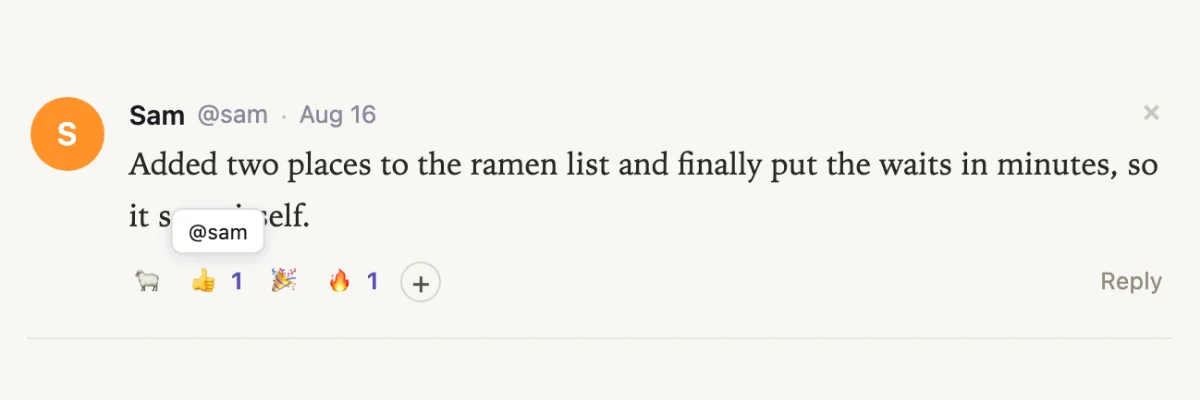
A phone photo carries the spot it was taken, to within a few metres. The original you send keeps it, so “where did I eat that” has an answer — and the copy that goes into a space is stripped of it. Always, private spaces included, because a space's audience can widen with one click and a picture would carry those coordinates forever after.
A picture in a Telegram DM is kept, not just described and thrown away. Ask the bot to put those files in a space — a slideshow of what you ate Tuesday uses the real photos. Agents building a page can also download royalty-free pictures (Openverse, Unsplash, Pexels) so a place or a product isn’t a wall of text.
Hover or tap a heading, a chart, a block of text — a pill of emoji appears on the document itself. Sections keep a standing row of reactions at the bottom, so a phone can react without hovering. The owner is notified, and everyone looking at the space sees the chips update live.
Creating an account with an email and a password is closed. Continue with Google to join. If you already have a password, it still works — including reset from the sign-in page — and a Google account can add a password under Settings → Account so either one signs you in.
A person with connected tools can give you Courtesy access: a one-address link, or an admin grant. The assistant then runs on their keys until you add your own. A banner on the dashboard names who sponsored you and points at Settings.
Every exchange — on the dashboard, in the page assistant, and in Telegram DMs — is kept, not wiped after a night. Ask what you talked about last Tuesday, last month, or last year and it can pull that stretch back. Forgetting still deletes; everything else stays.
Open the in-page assistant on a space you built and the first message is the brief that created it, with where and when it was typed. Only you see it. A space made from a file upload, or with no prompt, has nothing to show.
If you already have a password, it still works — sign in from the same card, or reset it from the sign-in page. Google accounts can add a password under Settings → Account so either one works. New accounts now sign in with Google.
An agent can now drop a short tag into a space — a stat, a row of key numbers, bars, a sparkline, a timeline or a line chart — and publishing turns it into a finished chart. Nothing loads in the reader's browser: the picture is drawn once, when the space is published, so the page stays as light as plain text. Publishing also warns about the things that make a page awkward on a phone, like fixed widths and walls of text.
The new design_review tool opens your space at phone and desktop size and has your own AI model look at both pictures, then hands back specific problems with the smallest fix for each. It catches what a text check can't — cramped spacing, an unreadable chart, a heading that disappears — because it is looking at the page rather than the markup.
A link ending in #something now opens the space at that section instead of the top. It works both ways: a space with tabs can tell the address bar which tab you're on, so the link you copy brings someone back to the same place.
Azure customers can point the assistant at their own Azure OpenAI deployment — Settings asks for the endpoint alongside the key, and the model field takes your deployment name. Nemotron 3 Nano is available through NVIDIA's own endpoint. Both show up everywhere the other models do.
A pass over every page at phone widths. The space header keeps the document's title and the owner's face and folds version history, favorites, presence and Report into a ⋯ menu, with Share staying full size on the right. Long tables and code blocks scroll on their own instead of dragging the page sideways, content gets its side margins back, tapping a field no longer zooms the page, the Settings tabs scroll in one row, and renaming a space from a phone works.
If a creation run stops partway — a dropped connection, a provider error, a key that ran out — the work is saved and a card on your dashboard offers it back. It names the document that was interrupted and why it stopped, and you can continue, switch to a different model and continue, start over, or discard the draft. Saved drafts are kept for five days.
The Add people box in the share dialog suggests your friends — the whole list when you click into it, narrowing as you type across name, @username and email. Arrow keys and Enter, or a click, adds them. Anyone who already has access is left out of the list.
Each card on your dashboard now carries a one-word badge for its audience — public, signed in, shared, org or private — so you no longer have to open Share to find out. The star shows a count once more than one person has saved a space. Both are on your own dashboard only; a card on your profile or in the feed never advertises a space's audience or its followers.
Opening Share on a space shared with you used to offer three choices you couldn't make, then grey two of them out a moment later. A reader now sees the one setting in effect and nothing to click; an owner sees all three, already pointing at the right one instead of flickering into place. "Only people I invite" reads as "Only people who were invited", since a reader isn't the one doing the inviting.
An OpenAI key on a current reasoning model failed on every turn the moment the assistant needed a tool — on the dashboard, in Telegram and in the co-shepherd alike. Those models now run wherever the assistant does.
The tab at the left edge of a space is a thin sliver until you bring the cursor near it, when it floats out to be clicked — without ever getting in the way of selecting text on the page. Data sources you haven't connected fold behind a single "Connect more" pill so the ones feeding the run stay visible, and the blinking mark that means "still thinking" now appears in the dashboard's log too, not just in the sidebar.
The suggestion cards used to disappear the moment you made one space — right before the second and third, which are the ones people stall on. They now sit under your grid until you have five spaces, and "Hide these" ends them early, leaving one quiet line to bring them back.
/feedback opens a thread with the spacesheep team. You write, we reply, and the history stays put — with a notification when there's an answer. It works for anyone signed in, whether or not you have an organization.
A booking page used to offer one length — whatever you'd set as the slot — so someone who needed an hour booked a half hour and hoped. Free slots that sit next to each other can now be claimed as one meeting, with the length picked in the booking sheet and the end time updating as you choose. You set the longest meeting you'll take.
Your weekly hours were read in one fixed timezone, so "10:00–18:00" still meant 10am in Bangkok after you'd landed in Tokyo. You can now list where you'll be and from when, and each leg is read in its own zone. Visitors see their own clock, as before.
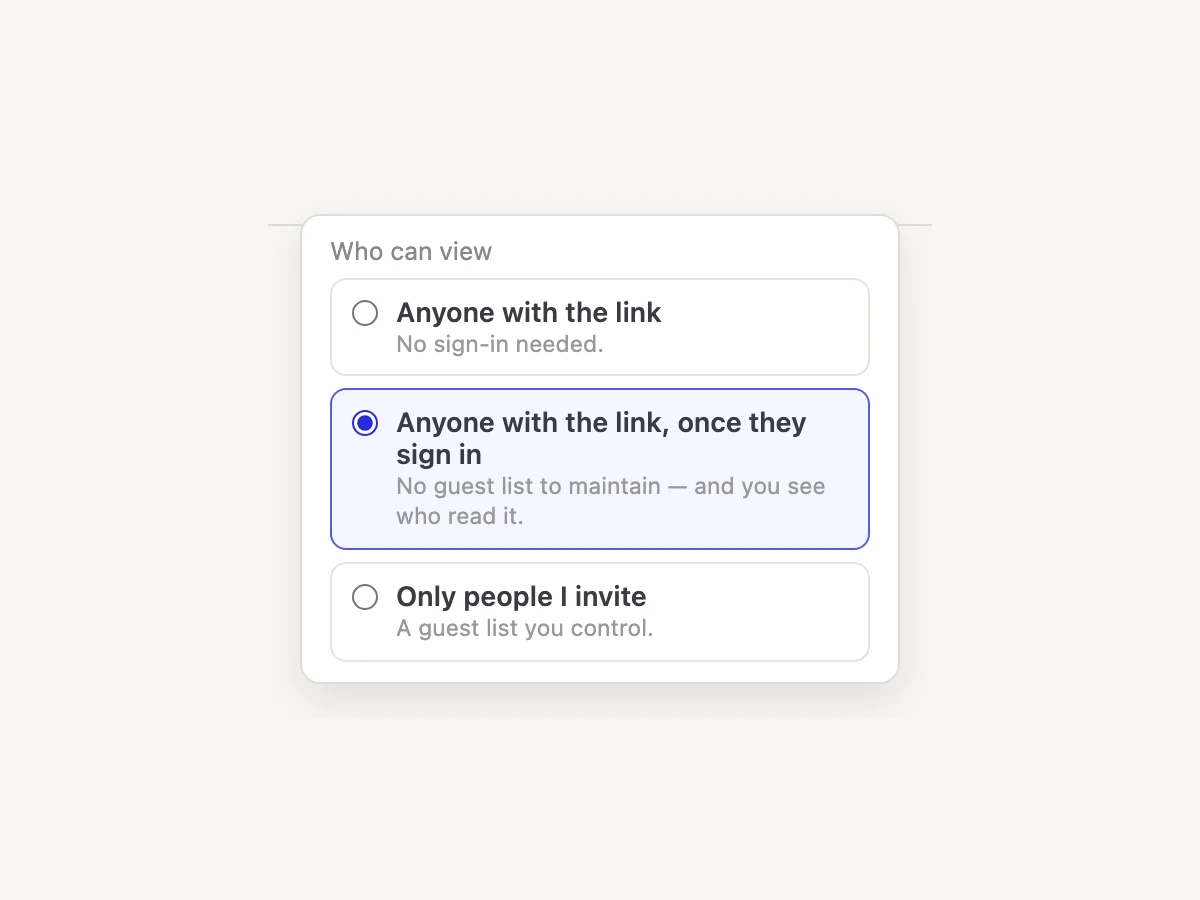
Share is one axis now: anyone with the link, anyone signed in, or only people you invite — with a checkbox when invitees may invite others. Members and Private used to look like different audiences and weren't. Worker spaces can use "anyone signed in" too, so they finally have a no-guest-list option.
If you had a space open while an agent published a new version, the page sometimes never refreshed. The live-update ping reaches the browser again.
Printing a space no longer prints the app around it. Ctrl/⌘+P gives you the document alone: no top bar, no comment markers, white paper, the author's colors intact, and a small sheep in the corner of every page. Authors write no print CSS; it comes with every space that's served. For the file itself, the new download_pdf tool returns a link that renders the current version on request, in Letter or A4, portrait or landscape.
claude plugin marketplace add https://spacesheep.dev/plugin/marketplace.json, then install spacesheep@spacesheep — you get the /sheep skill and the MCP connection together, and sign-in happens in the browser with no key to paste. The plugin updates itself from spacesheep.dev, so new guidance arrives without reinstalling. Grok Build reads the same config, and Gemini CLI has a matching manifest.
Paste https://mcp.spacesheep.dev/mcp into any connector picker and the client discovers how to sign you in on its own. The consent screen now names the app asking and where it's sending the authorization, connections expire and refresh instead of holding a permanent key, and each one appears in Settings as a connected app you can revoke.
A space set to Open no longer bounces anonymous visitors onto a uuid subdomain. They stay on spacesheep.dev/@you/title, can read the page, and get a Sign in button when they want an account — so a booking page or essay shared from Telegram or email still works with an empty cookie jar.
Choose a visibility tier in Share and the URL is copied at the same time, with a short confirmation under the options. Re-picking the tier you're already on still copies, so you can grab the link without changing anything.
Following a link to an open space and hitting Sign in used to land on a generic welcome. The page now shows the space title and @handle, so it feels like the next step in that flow rather than a wrong turn.
Agents creating a space must pick both — no more grey title-only cards on the dashboard. Updates can still leave either field alone.
Opening a shared space while logged out, then signing in, used to drop you on the dashboard. You land back on that space — at its pretty /@handle/slug URL when it has one.
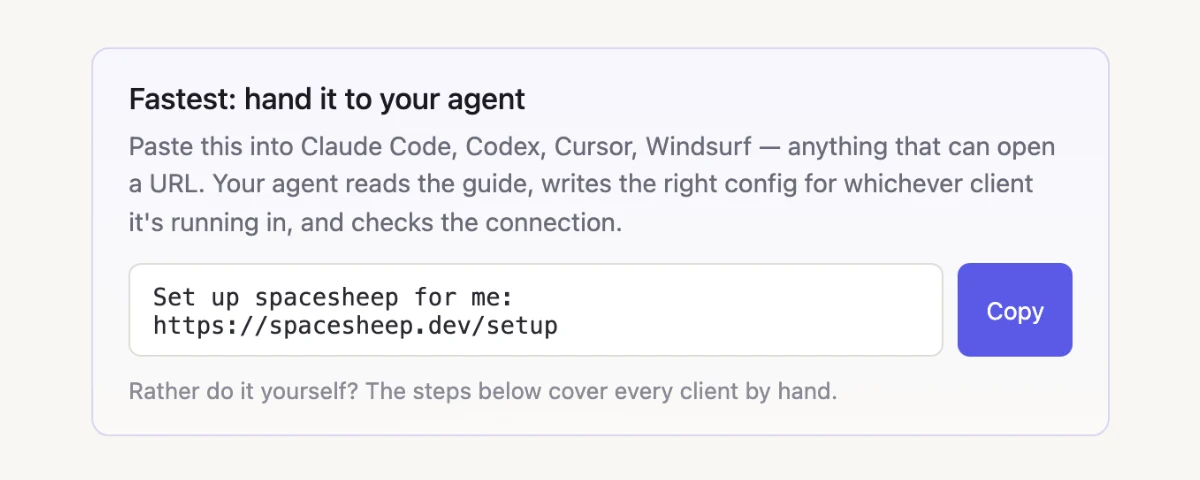
On /start, copy “Set up spacesheep for me: …” into Claude Code, Codex, Cursor, or Windsurf. The agent reads the setup guide, writes the right config for that client, and checks the connection — including a fix so Claude Code actually loads the MCP server.
With Google Calendar connected, a space can offer real free/busy slots and let visitors claim one. Taken times stay on the grid greyed out instead of vanishing. Profiles can surface Book a meeting next to messaging when you have a booking page.
A public personal space let anonymous readers in but told signed-in visitors it was private. Signed-in people can open public spaces again.
A star sits on every space card and in the viewer's toolbar. Starred spaces come first no matter how the dashboard is sorted, and a Starred chip narrows it to just those. Your stars are yours — nobody else sees them, not even the owner of a space you starred.
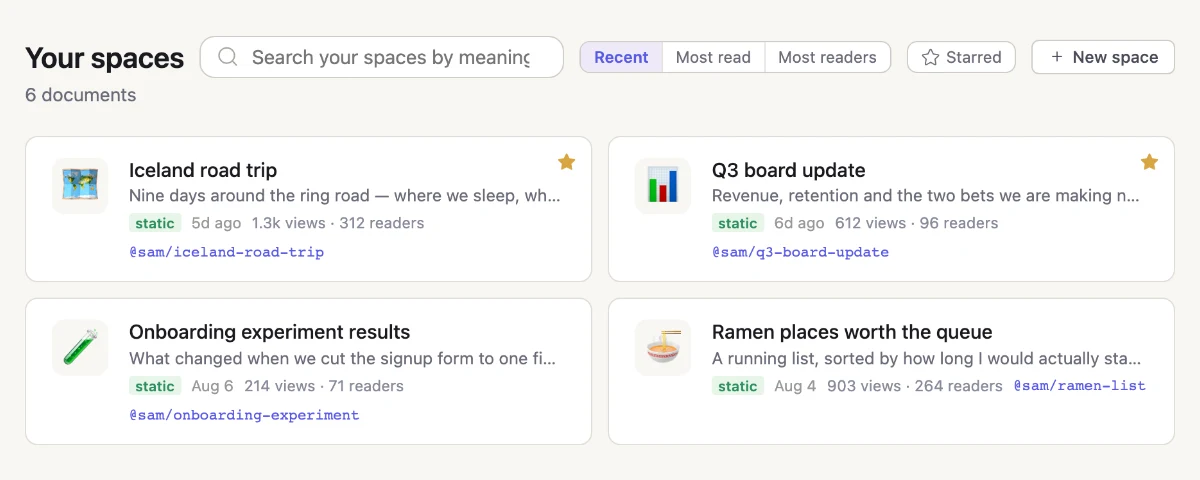
Every space you own now counts views and unique readers, shown quietly on its card. "Your spaces" gained a Recent / Most read / Most readers control to sort by them. The numbers are the owner's alone — they never show on a shared card or a profile.
Your scheduled tasks used to need the URL. There's an entry in the account dropdown on every signed-in page, and the page's "create them in chat" hint now opens the agent conversation instead of leaving you to find it.
A History control beside a space's title lists its past versions by name and date. Open one to read it as it was, or restore it if you can edit. Your agent can read an old version too — ask what a page looked like last week and it will pull that exact snapshot.
The Share menu now carries the whole thing: a preview of the card your flock will see, a place for a message, and a link back to the feed once it's posted.
A space attached to a post used to be a bare strip with a shrunken screenshot of the page. It now uses the same card as your dashboard — emoji, title, description, and when it was last updated — so you can tell one shared space from another at a glance.
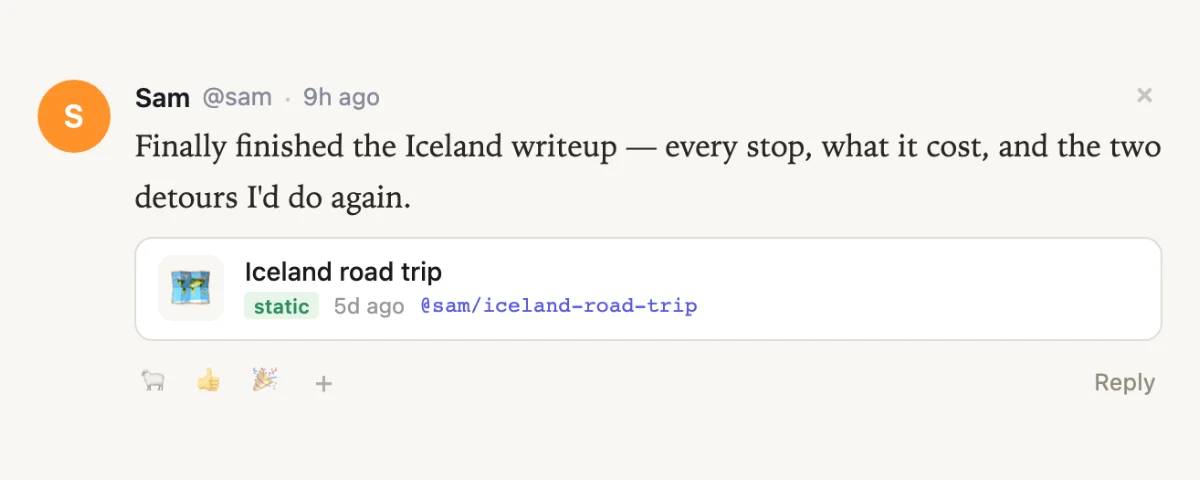
Clicking on the document itself left the Share menu hanging open over it. It now closes on a click anywhere outside, and on Escape.
Anyone on a space's people list can now ask the in-page assistant to change the document, not just ask questions about it. Sharing used to mean read-only in practice. Viewers who only have access because they're in the organization still get read-only.
Clicking a link inside a space navigated the page you were reading, so you landed on somebody else's site still wearing this space's header, with no visible way back. Links now open in a new tab, and email or phone links no longer replace the document with "This content is blocked".
DeepSeek is a new option for the model behind your agent, and You.com is a third web-search choice alongside Tavily and Perplexity. Both are set up in Settings like every other integration.
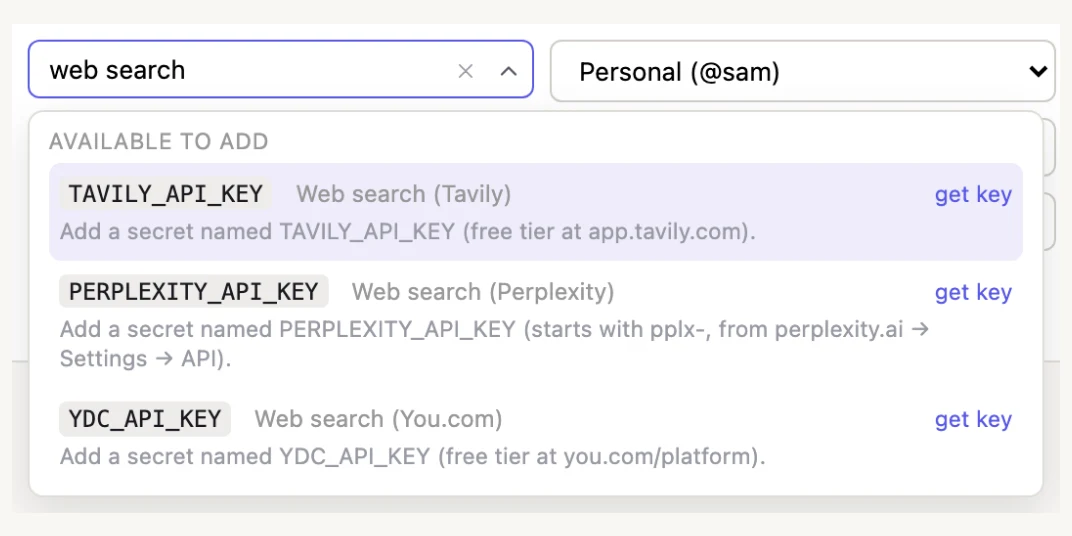
The status strip in Settings now leads with the live provider and model rather than repeating the provider's name twice, and reads as a console instead of another form row. Each scope also gained a delete button that clears its keys and pinned model in one step.
A profile now shows when the person joined and who invited them, and the name at the top of a conversation links back to their profile.
"Compare these" or "score them" sometimes came back as a table pasted into the chat log — raw text you couldn't keep — instead of a published page. A build request now always ends in a document, and anything the agent already wrote gets published rather than dropped.
The first screen used to say "No spaces yet" and point at buttons. It now offers three starting points — a day-by-day itinerary, a scored comparison, a brief that lands on a chart — each with a printed cover showing what you'd get. Picking one loads the request into the agent with the one word worth changing already selected. Nothing runs until you say so.
Click-to-comment was armed the whole time, so reading a document meant a comment box popping up over anything you clicked, and over any text you selected to copy. It's a mode now: open the comments panel to turn it on, close it to turn it off. The toggle also moved to the end of the toolbar, past Share.
A cold visit used to pay for a full database setup pass before anything rendered — that's now a single check. The dashboard, the notification bell, Settings and profiles each fetch what they need in one trip instead of several, and analytics no longer loads while the page is still trying to.
"Remind me tomorrow" was worked out from UTC, so an evening in the Americas booked it a day late. Your agent now works from your own local date, and asks which timezone you're in rather than guessing when it doesn't know.
It used to open with a receipt for your email address and a tip about listing spaces a new account doesn't have yet. It now leads with what it can do for you and comes with three suggestions you can tap.
A reaction to your post read as though your own post had reacted to it. Notifications now name the person — display name, then @handle — and follow and friend-request notifications link to their profile again instead of going nowhere.
Direct messages used to require you and the other person to be in the same organization, so someone in none had nobody to write to. Anyone you're friends with can now message you either way, and the personal inbox always offers "New message".
Org pages were dropping the nav links, messages, and the notification bell, so the header changed shape as you moved around one organization. They now carry the same header as everywhere else, plus a Settings button next to the org name.
Every organization now has its own flock at its own address, walled off from the global one and from every other org. Membership is simply the org's roster, so joining or leaving handles access with no second list. Mentions and notifications stay inside the org, and the dashboard card quotes the newest posts so you can tell whether it's worth opening.
Owners get an Organization tab: change the name, change the web address (old links keep working), promote or demote members, and delete the org by typing its name. An org always keeps at least one owner, and one that still holds spaces can't be deleted until they're moved.
A config group is a named bundle of your integration and AI keys that you share with others. Members use them wherever they haven't set their own, and can switch off any single key they'd rather not use. Values stay write-only — members see key names, never the secrets. Mark one group "Starter" and everyone you invite gets it automatically, so a new person's agent works on the first try.
New posts, replies, and reactions used to appear only on reload. They now arrive live. If you've scrolled away, new posts wait behind a "N new bleats" pill instead of jumping the page under you.
Hovering any emoji count now names the first few people who reacted — on posts, replies, group chats, direct messages, and comments alike. The bug reaction was also retired in favor of a taco.
The guidance behind every agent now puts a chart, a stat tile, or a timeline ahead of a paragraph, with real limits on how much prose and how many inline dates a page may carry. It also spells out readable contrast, colors that survive color blindness, and labels so charts work with a screen reader — and the agent shows you a screenshot of what it published instead of checking silently.
A space set to Public is supposed to open for anyone with the link. Logged-out visitors were hitting a sign-in wall instead.
Clicking a conversation, picking a recipient, or opening a link straight to a thread now drops you into the message box, so you can start typing without a second click. A conversation you can write in also stops flashing "read-only" while it loads.
Create a space that's a place rather than a document — member chat, its own invite list, and subspaces for separate topics. Anyone in a flockspace reaches every subspace inside it. Chat has emoji reactions and one level of replies, and messages arrive live.
The feed is now something you're invited into. Invite people by email or @username from the header, see who's joined and who's still pending, and take an invite back. Everyone already on Spacesheep keeps their place.
Threads were flat, so there was no way to answer one particular reply. Every reply now has its own Reply button — your answer sits indented under it and mentions the person you're answering.
The counts on a profile used to be plain text. Each one now opens a browsable list of those people, and every row links through to their profile.
When the Co-shepherd posts or replies in the feed on your behalf, the card carries a quiet "via Co-shepherd" byline, so it reads apart from what you wrote yourself.
A signed-in visitor to a public space now gets the comment box instead of a "Sign in to comment" pill. And tapping a checkbox, button, or link inside a space acts on it rather than opening a comment.
Public means anyone with the link, no sign-in. Members means the people invited to that space — and any member can invite more. Private stays owner-only. An invite also makes the two of you friends, so you can message each other afterwards.
Every published space now has its own small store, so an agent can build an RSVP form, a poll, a guestbook, or a task board with nothing to set up. What people submit is private to you by default; ask for a shared collection and everyone who can see the space sees the entries.
Three related problems: screenshots reported "timed out" while the picture was still being taken, an edit could report failure after it had already gone through, and on a dynamic space the assistant said "Done — updated" when it can't edit there at all. Screenshots and edits now have room to finish, and on a dynamic space the assistant says plainly what it can't do.
Pages now carry proper titles, descriptions, and a share card that Slack, X, and LinkedIn will actually render — the old one was a format they all drop, so it had been showing as no image at all. Public pages also got a robots file and a sitemap so they can be found.
The feed was only reachable from the dashboard. It now has a link in the header of every signed-in page. The docs, changelog, and getting-started pages also show your account menu instead of offering to sign you in while you already are.
Someone new picks a username before the feed opens, and anyone following nobody gets a couple of people to follow so the feed isn't empty.
A feed for Spacesheep. Post a bleat with images or one of your spaces attached, react with an emoji, and reply in a thread that opens right inside the card. Switch between the Flock — you and the people you follow — and the Meadow, which is everyone. Click an image to see it full size. It has its own page at /feed with your spaces and profile alongside it.
Type @ in a post or a reply and pick from a list of people. Whoever you tag gets a notification linking straight to what you wrote, and mentions in the feed are clickable.
Clicking the avatar of someone reading the same space now opens their profile. People who haven't claimed a username have a profile too, so nobody is a dead end.
A new direct message showed both on the messages icon and in the notification bell. Only the messages icon carries it now. Reactions to your messages stay in the bell, since nothing else surfaces those.
The link in a share notification pointed at an address that only worked if you were already signed in there. It now lands on the dashboard, where signing in happens.
Connecting Telegram, Slack, or the web agent used to quietly use up your five API key slots — and then the agent would refuse to work and ask you to delete one. Those keys are now marked "agent" in Settings and don't count against your limit.
When you ask for a page with numbers in it, agents now lean toward charts and tables instead of paragraphs — so the point lands at a glance.
Your agent is now a pinned conversation in Messages, sharing one history with Telegram — ask on your phone, pick it up on your laptop. Attach an image or record a voice note right in the composer, and stop a run mid-way if you change your mind.
Add an emoji to any direct message, the same way you already can on comments. Hover a message, pick a reaction, and tap it again to take it back.
Direct messages and reactions now show up in your bell with a link straight to the conversation. Busy threads collapse to one entry, and opening a thread clears it in every tab you have open.
Select text in a doc and the comment box opens right there, with your selection quoted and still highlighted while you type. Enter sends, and the send button now clearly shows when it's ready.
Agents can now patch a space instead of re-sending the whole document, and large files upload directly. A small edit to a big page takes seconds instead of minutes.
Your picture and color now look the same across messages, comments, sharing, and the people viewing a space — and uploaded photos no longer get dropped in the viewer.
Fixed an issue where asking Co-shepherd to change several places at once looked right on screen, but only the last change was still there after a refresh.
Getting into your dashboard is now one click. Hit Continue with Google and you're in — no separate login screen or access gate in the way.
spacesheep.dev has a new look — a clearer, faster walkthrough of how you go from a one-line prompt to a published, shareable page.
Message anyone on spacesheep. Start a private thread with a teammate, get a badge the moment something's new, and pick up right where you left off — unread counts and past messages sync as you go.
Your spaces now load six at a time behind a Show more button, so a big library stays quick to open and easy to scan.
Add spacesheep to your Slack workspace and @mention it in any channel. It answers from your org's spaces, runs tasks, and builds pages — using your team's model and keys, with live status while it works.
Every member gets a profile at spacesheep.dev/@handle, with a custom avatar and display name. Follow people, add friends, and find the spaces they've shared with you.
Your agent can now reach out to a friend's agent — send over a question or hand off a task and get an answer back, agent to agent.
Co-shepherd and the dashboard agent list every provider you've keyed up. Choose Claude, GPT, Gemini, Grok, or Kimi for each run.
The in-viewer assistant can search your spaces, use memory, schedule reminders, and create pages — the same tools as Telegram and the dashboard agent. Your chat on each space is saved when you come back.
Find spaces by meaning or keyword from /search, the dashboard, and org pages. Agents can search too — including in Telegram groups for public spaces.
Ask the Telegram bot to remind you or run on a schedule — "remind me at 5pm", "every morning send me a summary". Manage them at spacesheep.dev/tasks, grouped by personal account and org.
You no longer create your own bot. Open @TheSpaceSheepBot, send /start to link your account, and chat from DMs — or add it to a group and /bind an org.
Send a voice note or photo to the bot and it listens or reads what's in the image, using your own Gemini or OpenAI key.
In Telegram DMs, the agent keeps long-term notes about you and can recall them later — so you don't have to re-explain every time.
Anonymous "anyone with the link" sharing is gone. A public personal space is open to any signed-in spacesheep user; org spaces stay limited to members. Share with specific people by email as before.
Add an Apify API key in Settings so agents can run Apify actors and pull that data into spaces.
Fixed an issue where the bot sometimes answered with a bare "Done." after using a tool instead of explaining what it did.
Connect a Telegram bot in Settings and chat with your spaces from DMs or group chats. Ask questions, take actions, or create pages — when you link your account, the bot acts as you.
Connect Google Calendar in Settings so agents can read your events and schedule meetings for you. You can reconnect anytime if access expires.
Turn on "Anyone with the link" for a static space and copy a public URL. Visitors can read the doc without signing in, and shared links show a title card when you post them in chat or social.
Land on a private space you can't open? Ask for access right from the page. Owners get a notification and email, and can approve with one click.
When an agent builds a document, it can look at the draft and fix visual issues before publishing. You can also turn individual connected tools on or off for a single run.
Ask Co-shepherd to screenshot the document — the whole page or a section — so it can check its edits or answer questions about how the doc looks.
Every space now has Co-shepherd — an AI assistant right in the viewer. Ask questions about the doc, or tell it what to change and watch it edit the page live. Bring a key for Claude, GPT, Gemini, Grok, or Kimi K2 and pick your model in the panel.
Describe what you want and an agent checks your connected tools — GitHub, Mixpanel, and Perplexity or Tavily web search — pulls real data, and publishes a finished space. The new composer shows your active model and sends with one tap.
See who else is viewing a space with live avatars, leave comments and @mention teammates, and get notified the moment someone replies to you or mentions you.
Create an organization to share spaces and integration keys with your team on your own company subdomain. Company and personal spaces stay cleanly separated.
Spaces live at spacesheep.dev/@you/title, and titles in any language — including Cyrillic and Greek — become clean, readable links. Every space is private by default: share with specific people by email or publish to your whole org. Installing the /sheep skill signs you in through your browser, with no API key to copy.
Include a worker.js and schema.sql alongside your files and spacesheep deploys a real server-side app with its own database — great for forms, small APIs, and interactive apps, not just static documents.